Connecting Claude (or Any LLM) to an On-Premise Data Quality Platform
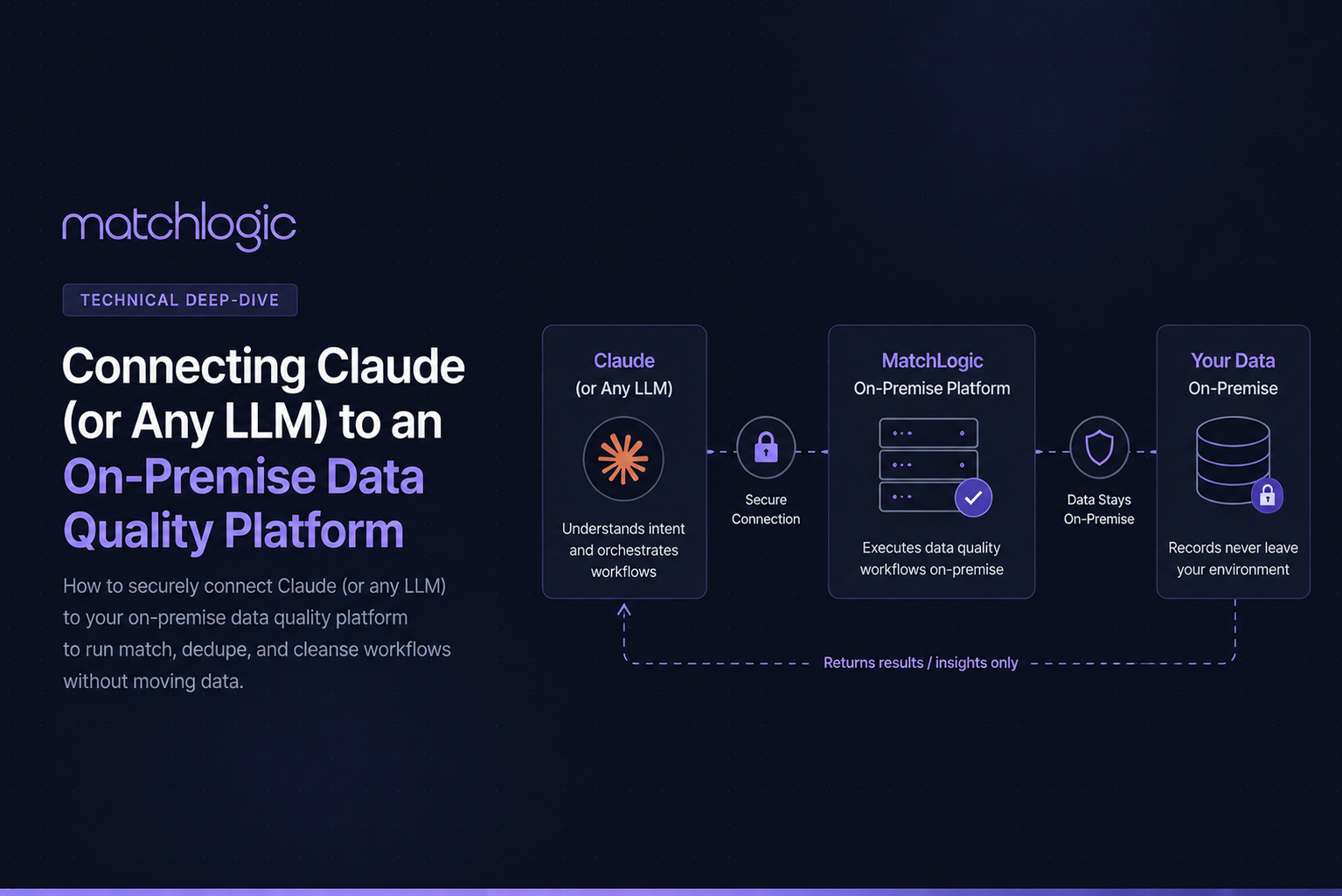
Connecting an LLM to a data quality platform means registering the platform's MCP server with an MCP-compatible client, so the model can discover the platform's tools and direct its workflows. The connection carries instructions and status, and in a control-plane design it never carries records. Once connected, an operator can direct cleansing and matching work in plain language, with each run confirmed before it executes.
The setup is deliberately unglamorous. There is no pipeline to build and no SDK to learn; the work is choosing a client, registering the server, and establishing who approves what, after which the platform's data matching operations become something the team can direct conversationally.
This walkthrough covers the prerequisites, the client choice, the connection steps, and the first workflow to run.
Key Takeaways
The connection is a client registration, not an integration project. You register the platform’s MCP server with an MCP-compatible client, and the client discovers the available tools.
Any MCP-compatible LLM works. Claude Desktop and Claude Code are the common starting points; agent frameworks and self-hosted models fit automation and isolated environments.
Instructions travel, records do not. In a control-plane design the connection carries workflow direction and status while the data stays inside the platform.
Run a supervised sample workflow first. It verifies discovery, exercises the approval gate, and lets you inspect exactly what crosses the protocol.
The AI proposes, you confirm. Set the approval owner before the first production run, not after it.
What Do You Need Before You Start?
Four things, and three of them are decisions rather than software. You need a platform that ships a workflow-class MCP server, a client to connect from, a network path between client and server, and a named person who owns approvals.
The last one matters most. The propose-and-confirm model only works if confirmation is somebody's job, so decide before connecting whether that is the data steward, the platform specialist, or the requesting analyst for low-stakes runs.
Which MCP Client Should You Use?
The client is where the conversation happens and where the model runs or is reached from. The table covers the common options.
Client
Best for
Where the model runs
Notes
Claude Desktop
Operators and analysts directing runs conversationally
Cloud (Anthropic)
Fastest start; control conversation leaves the network, records do not
Claude Code
Technical teams scripting and supervising workflows
Cloud (Anthropic)
Suits teams already working in terminal or IDE contexts
Agent framework
Scheduled and multi-step orchestration
Depends on the model configured
Approval gates must be preserved in the framework’s flow
Self-hosted model stack
Isolated and high-sensitivity environments
Inside your network
The choice is reversible. Because the server side does not change, teams commonly start with Claude Desktop for the pilot and add a framework or a self-hosted stack once the operating pattern settles.
How Do You Connect, Step by Step?
1. Choose the client and the approval owner
Pick from the table above based on who will direct runs and what may leave your network. Name the approval owner at the same time; the two decisions belong together.
2. Register the MCP server with the client
Add the platform's MCP server to the client's configuration using the registration details from your deployment; the exact snippet comes from your platform's documentation, and the Model Context Protocol site documents the client-side format for each supported client.
3. Verify discovery
A successful connection shows the platform's tools in the client's tool list. If the list is empty, the problem is the network path or the registration, not the model.
4. Run a supervised sample workflow
Direct a small run on sample data: a data cleansing pass or a limited dedupe against a test file. Watch the proposal appear, confirm it deliberately, and inspect what crossed the protocol.
5. Set the operating routine
Agree which request types are pre-approved for immediate confirmation and which require the specialist's review. Write it down; the routine is the difference between a pilot and a practice.
What Should the First Production Workflow Be?
Choose the run your team already trusts, executed the new way. A routine deduplication or standardization job with known expected results verifies the whole chain (proposal quality, approval flow, result reporting) without introducing a new data question at the same time; what to check during that run is covered in our guide to MCP server data security.
Resist starting with the hardest problem. The first workflow is infrastructure validation, and the exotic use cases go better once the routine ones are boring.
What Changes for the Team Afterward?
A university system shows the shift. Its data services group maintains 2.4 million student, applicant, and alumni records, roughly 130,000 unique individuals once enrollment and interaction history is separated, and every matching request used to queue behind one data engineer who knew the tool.
After connecting a client, the registrar's office directs routine matching in plain language and the engineer reviews proposals instead of building every run by hand. The mechanics of what the agent can and cannot do in that arrangement are in our walkthrough of the MCP server for entity resolution and data matching.
For institutions where instructions themselves cannot leave the network, the same setup runs with a self-hosted model; that posture is covered in our guide to air-gapped agentic workflows.
Conclusion
Connecting Claude or any LLM to a data quality platform is a small technical step attached to two important decisions: which client fits your network posture, and who owns confirmation. Get those right and the connection itself is a configuration entry.
The pattern to preserve through every choice is constant. The AI proposes, you confirm, and the records never enter the conversation.
Frequently Asked Questions
Which LLMs can connect to a data quality platform?
Any model reachable through an MCP-compatible client: Claude through Claude Desktop or Claude Code, models wired into agent frameworks, or self-hosted models for isolated environments. The platform side is the same in every case.
Does connecting an LLM expose my data to the model?
Not in a control-plane design. The connection carries workflow instructions, identifiers, and status; the records stay inside the platform's environment. Verify it during the supervised first run by inspecting tool-call payloads.
Do I need developers to set up the connection?
Registration is a configuration task rather than a development project, though technical review belongs in the loop for the network path and the payload inspection. No SDK work or pipeline building is involved.
Can the agent run workflows on a schedule?
Yes, through an agent framework, provided the framework preserves the approval step. Scheduled proposals that wait for confirmation keep the operating rule intact; scheduled execution without confirmation does not.
What if my environment is air-gapped?
Use a self-hosted model as the client's LLM so the agent, the protocol traffic, and the platform all run inside your boundary. The connection steps are the same; only the model location changes.
Ready to discuss your idea with us?
Let’s jump on a call and figure out how we can go from idea to product and beyond with Product Pilot.






.svg)