
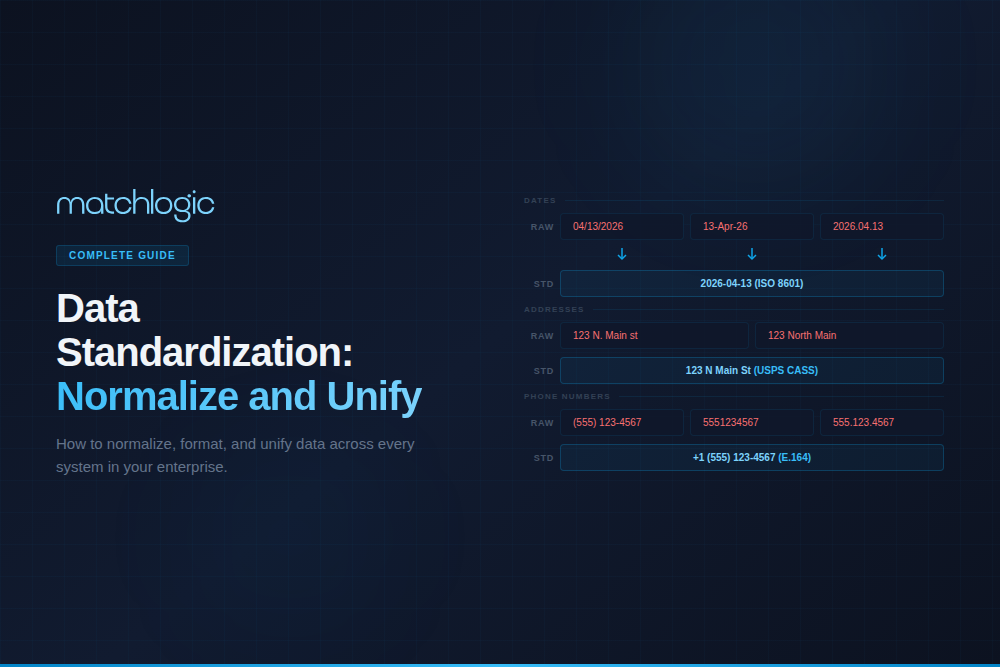
Data Standardization: How to Normalize, Format, and Unify Data Across Systems
Data standardization is the process of converting data from multiple sources into a consistent, uniform format that follows defined rules for structure, naming, and values. It includes format normalization (converting "Street" to "St." or vice versa), field parsing (splitting "Dr. Robert J. Smith Jr." into salutation, first, middle, last, suffix), value standardization (expanding abbreviations, correcting capitalization), and schema alignment (ensuring the same data element uses the same field name and type across all systems). Data standardization is the prerequisite for accurate data matching, deduplication, analytics, and master data management.
Enterprises on average use over 50 applications with different data entry rules and storage formats (Data Ladder industry research). Without standardization, the same entity appears in dozens of incompatible formats across systems, and every downstream process (matching, analytics, compliance reporting) must account for these variations or produce unreliable results. According to Gartner, poor data quality costs organizations an average of $12.9 million per year, and format inconsistencies are among the most common root causes. This guide covers the key domains of data standardization, the process for implementing it, its relationship to matching accuracy, and evaluation criteria for [INTERNAL LINK: 5A, data standardization tools].
Key Takeaways
- Data standardization converts inconsistent data into uniform formats; it is the prerequisite for accurate matching, deduplication, and analytics.
- The four key standardization domains are names, addresses, dates/identifiers, and organizational/product data.
- Standardizing data before matching improves deduplication accuracy by 40–50% (MatchLogic customer benchmarks).
- Address standardization uses postal authority rules (USPS CASS, Royal Mail PAF, global standards) to normalize location data.
- Name standardization parses compound name fields, resolves nicknames, and normalizes salutations and suffixes.
- Automated standardization via API prevents format drift as new records enter the system.
Why Does Data Standardization Matter for Enterprises?
Data standardization addresses a problem that compounds silently. Each system that stores entity data applies its own formatting conventions. CRM records use "CA" for California while the ERP uses "Calif." and the billing system uses "California." Phone numbers appear with and without country codes, dashes, parentheses, or spaces. Company names include or omit "Inc.," "LLC," or "Corporation" inconsistently.
These variations are individually trivial, but collectively they undermine every process that depends on comparing or aggregating data across systems. When a matching algorithm compares "123 North Main Street, Suite 400" against "123 N. Main St. Ste 400," the comparison is fuzzy even though the records are identical. When a BI dashboard aggregates revenue by state and "CA," "Calif.," and "California" are treated as three separate values, the report is wrong.
Standardization eliminates these variations before they cause downstream problems. It is the most cost-effective data quality investment because it prevents issues rather than detecting them after the fact. The 1-10-100 rule (attributed to data quality research and widely cited by Gartner) holds: it costs $1 to standardize a record at the point of entry, $10 to cleanse it later, and $100 in downstream damage if nothing is done.
“First profile revealed 40% missing data and format chaos we never suspected. Helped us fix issues before migration.”
— Michael Chen, VP Data Governance, Global Logistics Inc.
40% format issues identified before standardization began
What Are the Key Domains of Data Standardization?
Name Standardization
Name data is among the most variable in enterprise systems. The same person appears as "Dr. Robert J. Smith Jr.," "Robert Smith," "Bob Smith," "R.J. Smith," and "SMITH, ROBERT" across different sources. Name standardization includes: parsing compound name fields into structured components (salutation, first, middle, last, suffix), resolving nicknames to canonical forms ("Bob" to "Robert," "Bill" to "William"), normalizing capitalization, and removing extraneous characters.
For a technical deep dive on name parsing and matching, see our [INTERNAL LINK: 5C, name standardization guide].
Address Standardization
Address data requires standardization against postal authority rules. In the United States, the USPS Coding Accuracy Support System (CASS) defines the canonical format for addresses. "123 North Main Street, Suite 400" should be standardized to "123 N MAIN ST STE 400" per USPS conventions. Internationally, address standardization must account for country-specific formats: UK postcodes, Canadian postal codes, Japanese address hierarchies (prefecture, city, ward, block).
Address standardization is a prerequisite for [INTERNAL LINK: Article 1E, address matching]. Without it, the same physical location appears as dozens of format variants, and matching algorithms must rely on fuzzy comparison to connect them. With standardization, many of those fuzzy matches become exact matches. See our [INTERNAL LINK: 5B, address standardization guide] for USPS CASS, Royal Mail PAF, and global formatting rules.
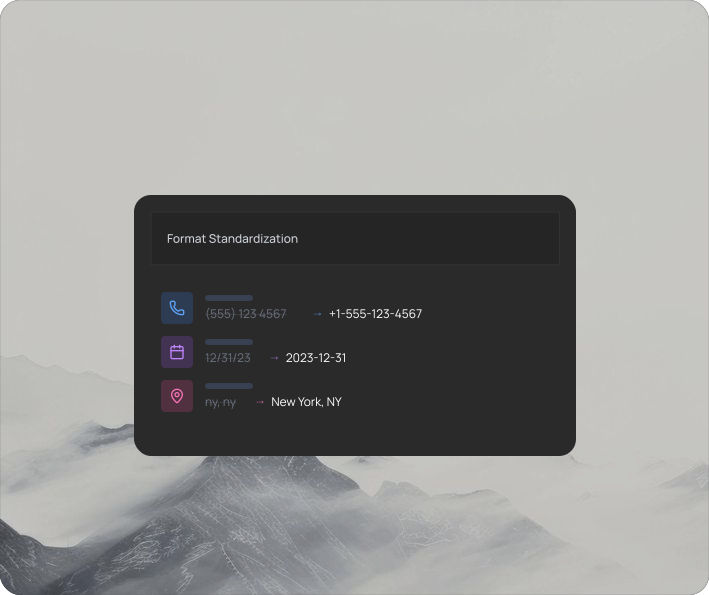
MatchLogic standardizes phone numbers, dates, addresses, and abbreviations into uniform patterns, converting format variations into exact-matchable values.
Date and Identifier Standardization
Dates appear as MM/DD/YYYY, DD/MM/YYYY, YYYY-MM-DD, "January 15, 2024," "15-Jan-24," and dozens of other formats across enterprise systems. Without standardization, date comparisons fail or produce incorrect results. The solution is converting all dates to a single format (ISO 8601: YYYY-MM-DD is the enterprise standard) at the point of entry.
Identifier standardization applies the same logic to phone numbers (strip non-numeric characters, add country code), SSNs (consistent hyphenation or none), EINs, DUNS numbers, and product codes. The goal is a canonical format per identifier type that every system uses.
Organizational and Product Data Standardization
Company names require normalization of legal suffixes ("Inc.," "LLC," "Corp.," "Corporation," "Limited"), removal of noise words, and resolution of abbreviations. Product data requires SKU normalization, unit of measure standardization, and category alignment across catalogs. These are particularly challenging for [INTERNAL LINK: Article 5D, data standardization for data migration] projects where two merging organizations use completely different classification systems.
How Does Standardization Improve Matching Accuracy?
The connection between standardization and matching accuracy is direct and measurable. MatchLogic customer benchmarks consistently show that standardizing input data before matching improves deduplication accuracy by 40–50%. The mechanism is simple: matching algorithms compare field values, and when format variations are eliminated before comparison, uncertain fuzzy matches become certain exact matches.
Address Comparison
- Without Standardization: "123 North Main Street" vs. "123 N. Main St." = Fuzzy match (87% confidence)
- With Standardization: Both standardized to "123 N MAIN ST" = Exact match (100% confidence)
Name Comparison
- Without Standardization: "Robert J. Smith" vs. "Bob Smith" = Fuzzy match (72% confidence, needs review)
- With Standardization: Both parsed + nickname resolved: "ROBERT SMITH" = Exact match on canonical name
Phone Comparison
- Without Standardization: "(555) 123-4567" vs. "5551234567" = Fuzzy match (needs normalization logic)
- With Standardization: Both standardized to "5551234567" = Exact match
Company Comparison
- Without Standardization: "IBM Corp" vs. "International Business Machines" = No match (different strings entirely)
- With Standardization: Both standardized via corporate dictionary: "INTERNATIONAL BUSINESS MACHINES" = Exact match
This is why MatchLogic integrates standardization directly into the matching pipeline. Data flows from the [INTERNAL LINK: Cluster 4 Pillar, cleansing engine] through standardization and into the [INTERNAL LINK: Cluster 1 Pillar, matching engine] without exports, format conversions, or pipeline breaks.
40%
Average reduction in data errors after standardization
<3 min
To standardize 1 million records at scale
96%
Format consistency achieved across all sources
How Do You Implement Data Standardization?
Step 1: Profile Your Data to Identify Variations
Before writing any standardization rules, profile every source dataset to understand the actual format variations. How many date formats exist? How many address abbreviation styles? What percentage of name fields are compound (full name in one field) vs. parsed? Profiling provides the factual basis for rule configuration and helps prioritize which fields need standardization most urgently.
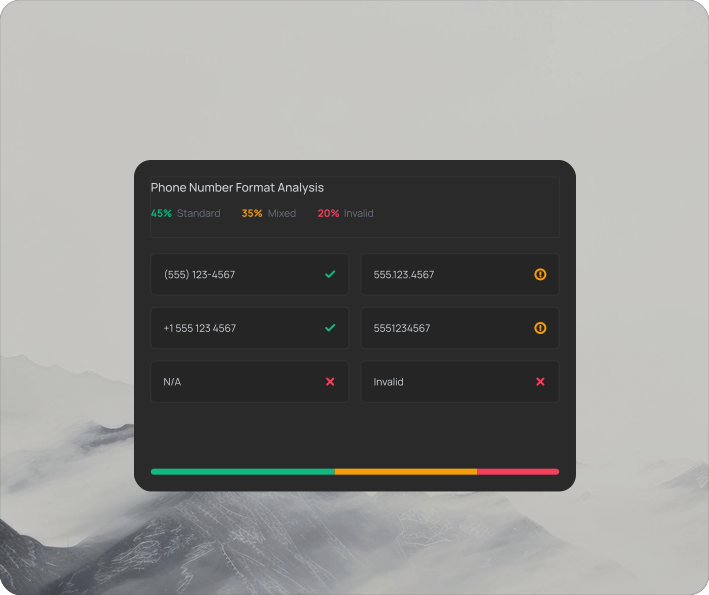
MatchLogic's profiling engine maps format chaos per field, showing exactly how many variations exist and which source systems produce the most inconsistencies.
Step 2: Define Your Canonical Standards
For each data domain (names, addresses, dates, phones, identifiers, company names), define the canonical format that all records will be converted to. Document these standards in a data dictionary or governance framework. For addresses, adopt USPS CASS conventions for US data and equivalent postal standards for international data. For dates, use ISO 8601 (YYYY-MM-DD). For phone numbers, use E.164 international format or a consistent domestic pattern.
Step 3: Configure and Test Transformation Rules
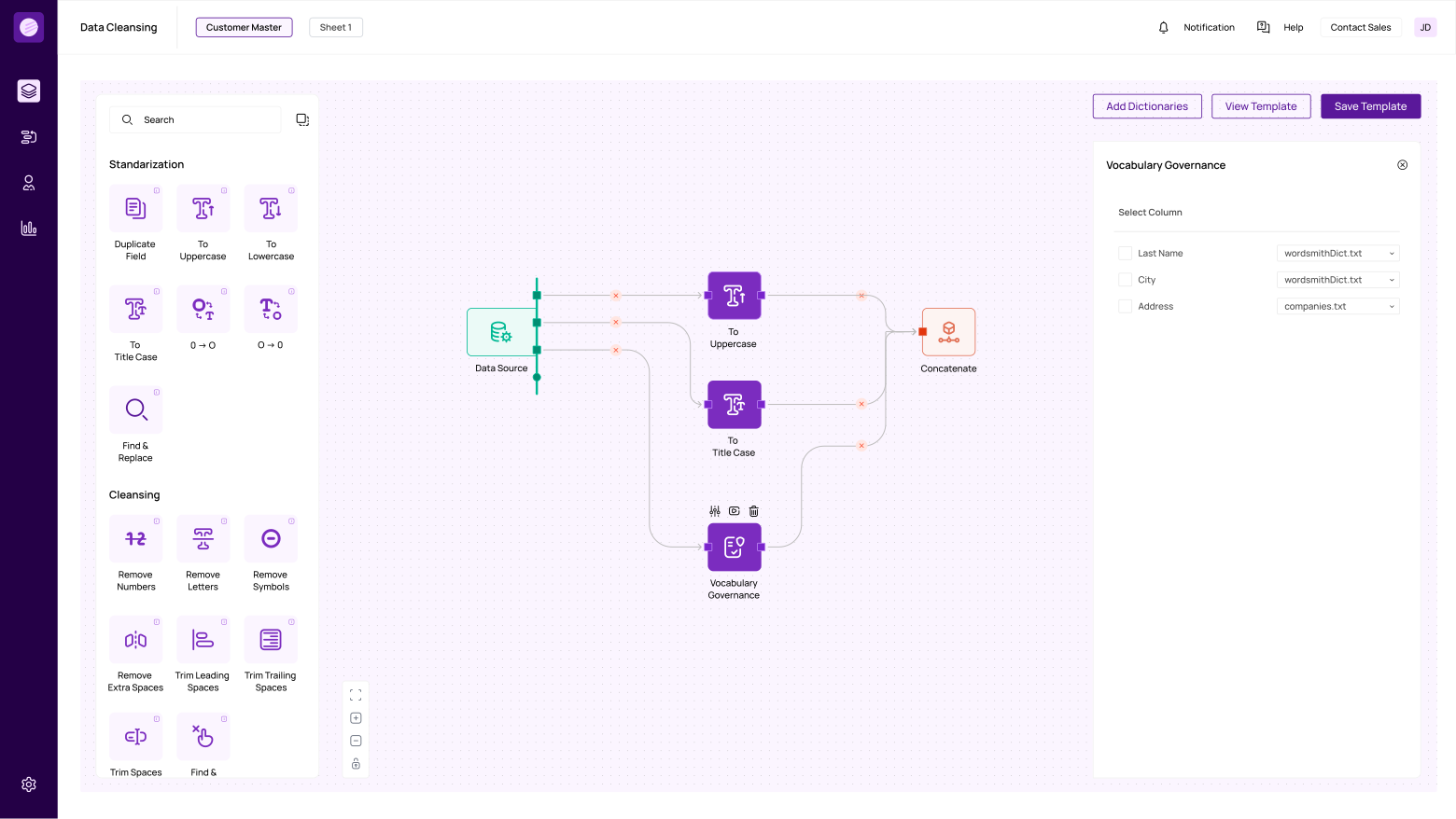
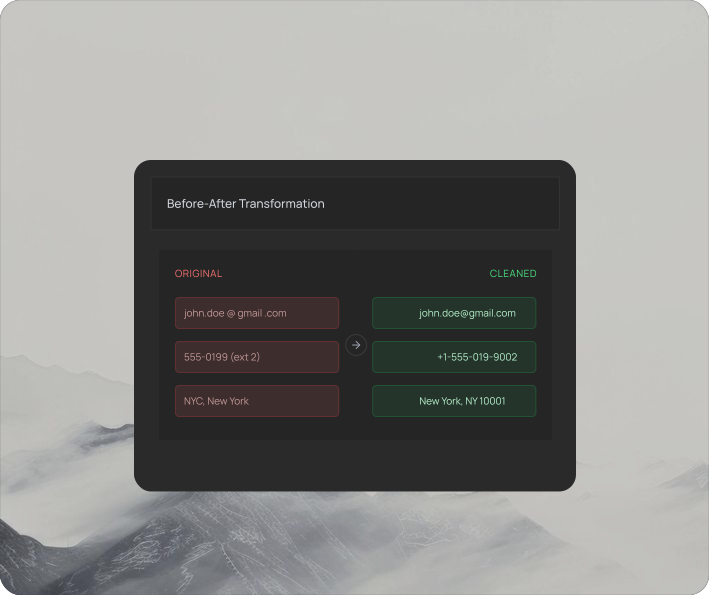
Build transformation rules for each field type: parsing logic for compound fields, abbreviation expansion/contraction dictionaries, case conversion rules, pattern validation, and vocabulary governance (flagging and replacing noise terms like "LLC," "N/A," or "TBD"). Test rules on a representative sample before applying to the full dataset. MatchLogic's live before/after preview shows the effect of every rule on actual data before you commit.
Step 4: Apply and Validate
Run standardization on the full dataset. Validate results by re-profiling the standardized output: format variation counts should drop dramatically, completeness should improve (parsed fields create new non-null values), and consistency scores should reach 95%+ across all fields.
Step 5: Embed in Pipelines for Ongoing Consistency
Standardization rules must run on every new record at the point of entry. Embed them in your ETL/ELT pipelines via API. Schedule periodic re-profiling to detect drift. Without ongoing enforcement, format variations re-accumulate within months as new data sources, entry points, and personnel introduce their own conventions.
Why Is Standardization Critical Before Data Migration?
Data migration projects (CRM upgrades, ERP implementations, post-merger integrations) are the highest-risk scenario for data quality. Migrating unstandardized data means importing every format variation, abbreviation inconsistency, and compound field from the legacy system into the new one. The new system inherits every quality problem from the old one, plus creates new duplicates when the same entity exists in both systems under different formats.
Standardizing before migration eliminates this risk. A manufacturing company migrating from SAP to Oracle standardized 4.2 million supplier records before migration, reducing format variations from 47 address patterns to 3, resolving 12,000 duplicate vendors that would have been imported as separate records, and cutting post-migration data cleanup time from an estimated 6 months to 2 weeks. For migration-specific guidance, see our [INTERNAL LINK: 5D, data standardization for migration guide].
“Matched 1.8 million records across three systems with under 2% false positives. Finally have a single source of truth we actually trust.”
— Robert Tanaka, Director of Data Operations, Summit Financial Group
1.8M records standardized and matched across three systems
How Should You Evaluate Data Standardization Tools?
Domain Coverage
- What to Assess: Does it handle names, addresses, dates, phones, company names, and custom fields? Does it support international formats?
- Why It Matters: Enterprise data spans multiple domains and geographies. A tool limited to US addresses misses 80% of standardization needs.
Parsing Capability
- What to Assess: Can it parse compound fields into structured components? Name parsing? Address parsing? Custom field splitting?
- Why It Matters: Compound fields are the primary blocker for accurate matching. Without parsing, matching operates on unparsed strings.
Dictionary and Rules
- What to Assess: Built-in abbreviation dictionaries? Vocabulary governance? Custom rule creation? Regex support?
- Why It Matters: Pre-built dictionaries accelerate deployment. Custom rules handle industry-specific patterns.
Integration with Matching
- What to Assess: Does standardized output feed directly into matching/dedup workflows? Or does it require export and re-import?
- Why It Matters: Pipeline breaks between standardization and matching introduce errors and slow deployment.
Preview and Testing
- What to Assess: Can you preview before/after transformations? Test rules on samples before full-dataset runs?
- Why It Matters: Blind standardization risks destroying meaningful data. Preview prevents mistakes.
Deployment
- What to Assess: On-premise, cloud, or hybrid? API for pipeline integration? Scheduled automation?
- Why It Matters: Regulated industries require on-premise. Pipeline integration makes standardization continuous.
Standardization Is the Multiplier for Every Data Quality Investment
Data standardization is the single highest-ROI data quality activity because it amplifies the effectiveness of every downstream process. Matching accuracy improves by 40–50%. Deduplication catches records that would otherwise hide behind format variations. Analytics and BI dashboards aggregate correctly. Compliance reports reflect actual entity counts instead of inflated duplicates.
The process (profile, define standards, configure rules, apply, embed in pipelines) is straightforward, and the tools exist to execute it at enterprise scale. The critical success factor is treating standardization as a continuous pipeline discipline, not a one-time cleanup.
MatchLogic integrates standardization directly into the profiling, matching, and merge purge pipeline. Format transformations, name parsing, address normalization, and vocabulary governance run within the same platform that identifies duplicates and creates golden records, all on-premise for organizations where data residency is non-negotiable.
“As part of the journey we've gone through with MatchLogic, we're becoming more data-first, moving from assumption to assurance around data quality.”
— Daniel Hughes, VP of Analytics, Finverse Bank
Frequently Asked Questions
What is data standardization and how does it differ from data cleansing?
Data standardization converts data into uniform formats following defined rules (e.g., all dates to YYYY-MM-DD, all addresses to USPS CASS format). Data cleansing is broader: it includes standardization plus removing invalid values, fixing errors, and filling missing fields. Standardization is a subset of cleansing focused specifically on format consistency.
What is the difference between address standardization and address validation?
Address standardization normalizes the format of an address (abbreviations, component ordering, capitalization). Address validation confirms that the standardized address actually exists as a deliverable location by checking it against postal authority databases (USPS, Royal Mail). Standardization fixes format; validation confirms existence. Both are needed for high-quality address data.
Does standardization improve matching accuracy?
Yes, significantly. MatchLogic customer benchmarks show 40–50% improvement in deduplication accuracy when data is standardized before matching. Standardization converts format variations into consistent values, turning uncertain fuzzy matches into certain exact matches.
Can data standardization run on-premise?
Yes. On-premise standardization platforms process all data within your secured infrastructure. MatchLogic is built for on-premise deployment, ensuring PII, PHI, and regulated data never leave your network.
What standards should I use for different data types?
Dates: ISO 8601 (YYYY-MM-DD). Phone numbers: E.164 or consistent domestic format. US addresses: USPS CASS. International addresses: country-specific postal standards. Names: parsed components with canonical first-name resolution. Company names: standardized legal suffixes with noise-word removal.
How do you prevent format drift after standardization?
Embed standardization rules in your data pipelines via API so every new record is standardized at the point of entry. Schedule periodic profiling scans to detect new format variations. Set alerts when format consistency drops below your threshold.





.svg)