
Data Integration Steps: Planning, Executing, and Validating Enterprise Data Projects
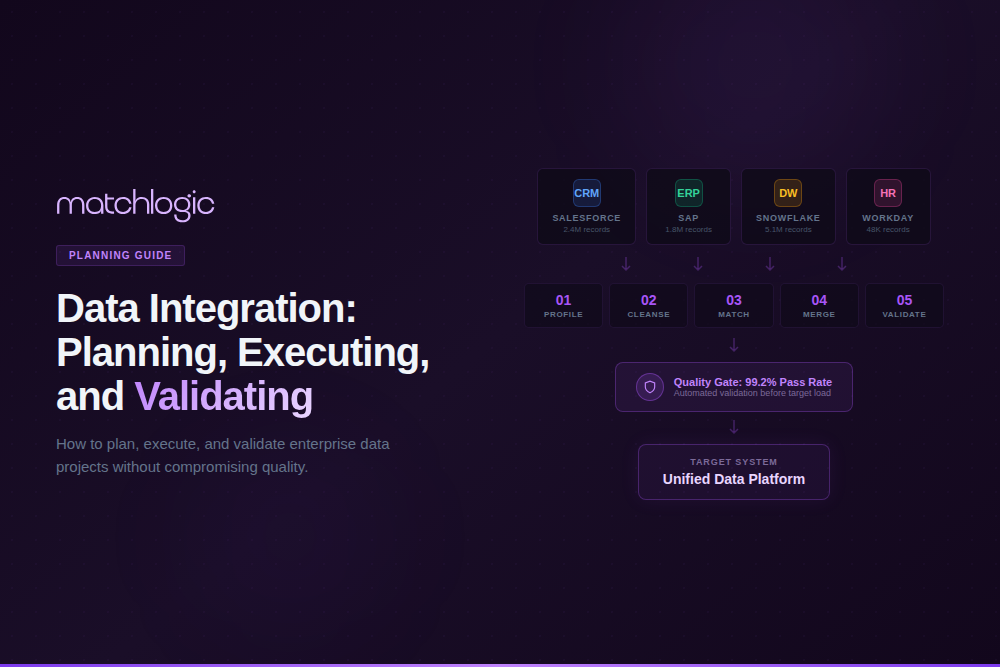
Data integration is the process of combining data from multiple disparate sources into a unified, consistent view that supports analytics, operations, and decision-making. The integration lifecycle includes planning (defining goals, sources, and architecture), extraction (pulling data from source systems), transformation (cleansing, standardizing, and restructuring data), loading (writing data to the target system), and validation (confirming accuracy, completeness, and quality of the integrated output). Data integration is the technical backbone of system migrations, post-merger consolidations, master data management implementations, and data warehouse/lake projects.
The most common reason data integration projects fail is not a technology limitation; it is data quality. According to Gartner, 83% of data migration projects either fail or exceed their budgets and schedules, and poor source data quality is the number one cited cause. Dirty, unstandardized, duplicate-laden source data does not become clean when it moves to a new system; it becomes a permanent quality problem in the new system. This guide covers the end-to-end integration process with a specific focus on the data quality steps (profiling, cleansing, standardization, matching) that determine whether your integration project succeeds or fails. For the most common migration pitfalls, see our [INTERNAL LINK: 6A, data migration problems guide].
Key Takeaways
- Data integration combines data from multiple sources into a unified view; the lifecycle spans planning, extraction, transformation, loading, and validation.
- 83% of data migration projects fail or exceed budget, with poor source data quality as the top cause (Gartner).
- The data quality steps (profile, cleanse, standardize, match, deduplicate) are the most critical and most commonly skipped stages of integration.
- Profiling source data before migration reveals the actual quality baseline and prevents importing hidden duplicates and format chaos.
- Post-integration validation must compare record counts, field completeness, and duplicate rates between source and target systems.
- On-premise integration tools address data residency requirements when migrating sensitive records (PHI, PII, financial data).

What Are the Key Data Integration Steps?
Enterprise data integration follows eight stages. The first four (plan, profile, cleanse, standardize) are preparation stages that most organizations rush through or skip entirely. The remaining four (extract, match/deduplicate, load, validate) are execution stages. Skipping the preparation stages is the primary reason integration projects fail.
Step 1: Define Integration Goals and Scope
Before touching any data, define what success looks like. Which source systems are in scope? What is the target system? What are the business outcomes the integration should enable (unified reporting, Customer 360, regulatory compliance, operational efficiency)? What entity types are being integrated (customers, vendors, products, transactions)? What is the timeline and budget?
Scope creep is the second most common cause of integration failure. A CRM migration that starts with contacts and accounts and then expands to include opportunities, cases, campaigns, and custom objects can triple in complexity. Define scope explicitly, get stakeholder sign-off, and resist additions until the initial scope is complete.
Step 2: Profile Source Data Quality
This is the step most organizations skip, and it is the step that determines project success. Profile every source dataset to measure completeness (what percentage of records have values for each field), consistency (how many format variations exist per field), validity (how many values fail pattern or range checks), and duplicate rate (what percentage of records are duplicates within each source and across sources).
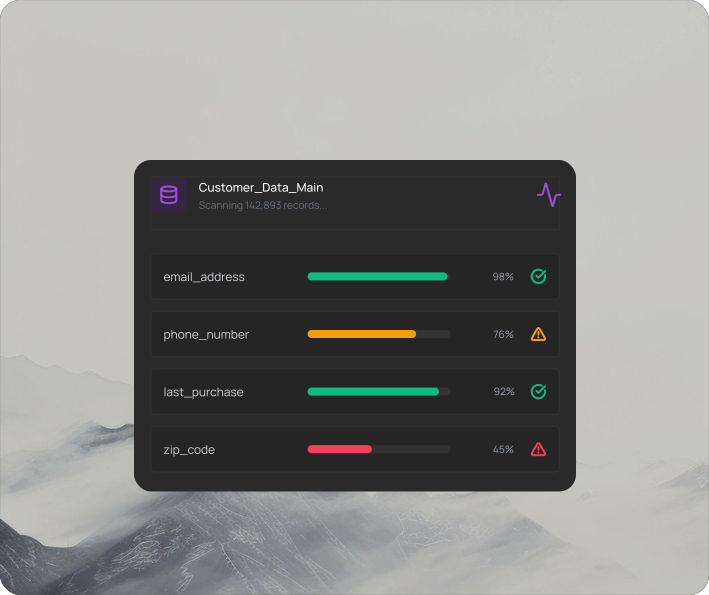
MatchLogic profiles millions of records in seconds, revealing the actual quality baseline of your source data before any integration begins.
A global bank preparing for a post-merger integration profiled 200 legacy databases and discovered inconsistent customer ID formats across 47 different systems, 23% duplicate customer records, and 35% of address fields using non-standard abbreviations. Without profiling, all of that quality debt would have been imported into the consolidated system.
"First profile revealed 40% missing data and format chaos we never suspected. Helped us fix issues before migration."
— Michael Chen, VP Data Governance, Global Logistics Inc.
40% quality issues identified before migration began
Step 3: Cleanse and Standardize Source Data
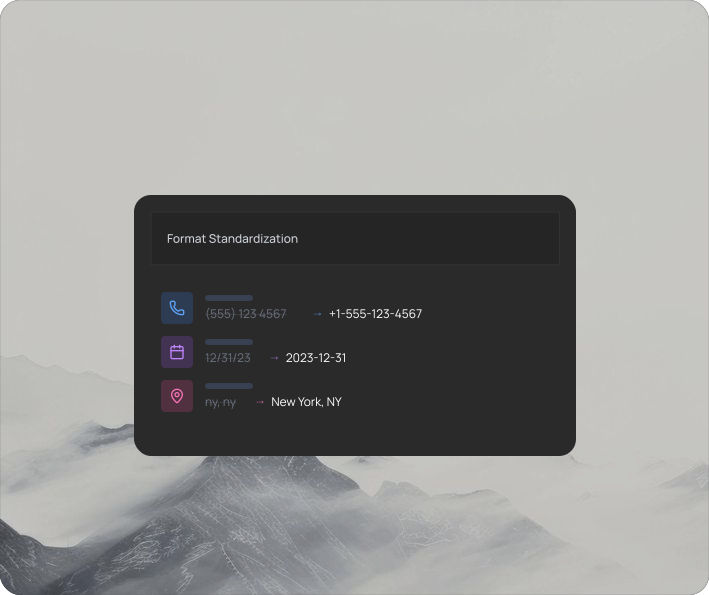
Once profiling reveals the quality issues, fix them before extraction. Remove invalid values. Standardize formats (dates to ISO 8601, addresses to postal standards, phone numbers to consistent patterns). Parse compound fields into structured components. This is the stage where [INTERNAL LINK: Cluster 4 Pillar, data cleansing] and [INTERNAL LINK: Cluster 5 Pillar, data standardization] directly determine integration success.
MatchLogic's cleansing and standardization engine handles this stage within the same pipeline that will later match and deduplicate the data, eliminating the need for separate tools and export/import steps between stages.
Step 4: Match and Deduplicate Across Sources
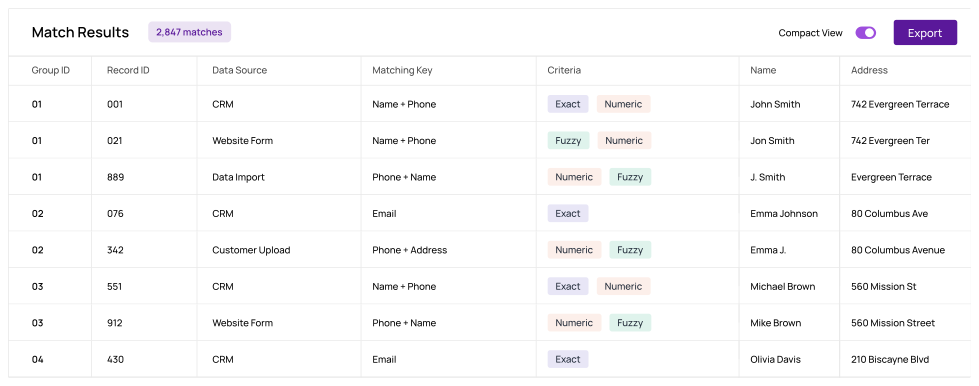
Before loading data into the target system, run [INTERNAL LINK: Cluster 1 Pillar, data matching] across all source datasets to identify records that refer to the same entity. This is critical for post-merger integrations (where two companies' customer databases overlap) and system consolidations (where the same entity exists in multiple legacy systems). Without cross-source matching, duplicates from every source system accumulate in the target.
A manufacturing company migrating from three legacy ERPs to a single Oracle instance ran cross-source matching on 4.2 million supplier records and found 12,000 duplicate vendors that existed across all three systems. Without matching, those 12,000 vendors would have been imported as 36,000 separate records, tripling vendor management overhead and creating duplicate payment risk.
Step 5: Extract Data from Source Systems
Extract cleansed, standardized, deduplicated data from source systems. Extraction methods vary by source: database queries for relational systems, API calls for cloud applications, flat file exports for legacy systems, and change data capture (CDC) for real-time or incremental integration. Document the extraction logic and schedule so the process is repeatable.
Step 6: Transform and Map to Target Schema
Transform extracted data to conform to the target system's schema: field mapping (source field X maps to target field Y), data type conversion, business rule application (calculating derived fields, applying default values), and restructuring (normalizing or denormalizing as the target requires). Document every transformation rule for auditability and future reference.
Step 7: Load into Target System
Load transformed data into the target system. For initial loads (full migration), use bulk loading methods that bypass application-level validation for speed, then run validation afterward. For ongoing integration (incremental or real-time), use API-based loading with error handling and retry logic. Maintain load logs that record every record processed, loaded, rejected, or errored.
Step 8: Validate and Reconcile
Post-load validation is the quality gate that determines whether the integration succeeded. Compare record counts between source and target (every record accounted for). Compare field completeness (no data lost in transformation). Run duplicate detection on the target to confirm that cross-source matching prevented duplicate imports. Run sample-based accuracy checks on transformed fields.
A health system migrating 2 million patient records ran post-load validation and discovered that 3,400 records had lost middle name data during transformation (a field mapping error) and 1,200 records had been duplicated due to an extraction timing issue. Both were caught and corrected before go-live because the validation step was built into the process, not treated as optional.
What Are the Most Common Data Integration Failures?
Importing Duplicates
- Root Cause: No cross-source matching before load. Each source's duplicates carry over, plus new cross-source duplicates form.
- Prevention: Run matching and deduplication across all sources before extraction (Step 4).
Format Chaos in Target
- Root Cause: Source data not standardized before load. Target inherits every format variation from every legacy system.
- Prevention: Standardize all source data to canonical formats before extraction (Step 3).
Data Loss During Transform
- Root Cause: Field mapping errors, truncation, character encoding issues, or null handling bugs in transformation logic.
- Prevention: Validate sample transformations before full load. Compare field completeness source vs. target (Step 8).
Scope Creep
- Root Cause: New entity types, additional source systems, or expanded business rules added mid-project without timeline adjustment.
- Prevention: Define scope explicitly in Step 1. Require formal change requests for additions.
No Post-Load Validation
- Root Cause: Team assumes if the load completed without errors, the data is correct. Subtle quality issues go undetected until business users report problems.
- Prevention: Build validation into the project plan as a mandatory gate (Step 8). Never skip it.
Where Do Data Integration Projects Have the Highest Stakes?
Healthcare: EHR Consolidation and EMPI
Healthcare data integration projects, whether consolidating EHR systems after a hospital acquisition or building an Enterprise Master Patient Index (EMPI), carry patient safety implications. A failed integration that creates duplicate patient records or loses medication history data can contribute to adverse events. For healthcare-specific quality requirements, see our [INTERNAL LINK: 6B, data quality in healthcare guide].
Financial Services: Post-Merger Account Consolidation
When two banks merge, their customer, account, and transaction databases must be integrated without losing data, creating duplicates, or breaking regulatory reporting. The data quality stakes are measured in regulatory penalties: missing KYC records, inaccurate transaction histories, or duplicate account numbers all trigger compliance violations. For financial services data accuracy requirements, see our [INTERNAL LINK: 6C, data accuracy in financial services guide].
Manufacturing and Retail: ERP Migration
ERP migrations (SAP to Oracle, legacy to cloud) involve millions of records across vendors, products, transactions, and master data. The complexity is compounded by the fact that ERP data often has decades of accumulated quality debt: duplicate vendors, inconsistent product codes, obsolete records that were never archived. Standardizing and deduplicating before migration is the only way to avoid importing that debt.
"Matched 1.8 million records across three systems with under 2% false positives. Finally have a single source of truth we actually trust."
— Robert Tanaka, Director of Data Operations, Summit Financial Group
1.8M records integrated across three legacy systems
How Does Data Integration Fit Into a Broader Data Quality Program?
Data integration is not a one-time project; it is an ongoing capability within a broader data quality program. Every time a new data source is connected, an acquisition is completed, or a system is upgraded, integration quality challenges recur. A mature data quality program addresses this by embedding profiling, cleansing, standardization, and matching into the data pipeline as permanent automated stages.
For a framework on building an enterprise-wide data quality program that encompasses integration, see our [INTERNAL LINK: 6D, building a data quality program guide]. That guide covers governance structures, tool selection, metric frameworks, and organizational alignment for sustained data quality improvement.
Data Quality Is the Foundation of Successful Data Integration
The eight-step integration process (define goals, profile, cleanse, standardize, match, extract, transform/load, validate) is straightforward in concept but demanding in execution. The steps most organizations skip or rush, profiling, cleansing, standardization, and matching, are precisely the steps that determine whether the integration succeeds.
The 83% failure rate for migration projects (Gartner) is not a technology problem; it is a data quality problem. Organizations that invest in understanding their source data before moving it, that standardize formats before loading, and that deduplicate across sources before consolidating, consistently deliver integration projects on time, on budget, and with clean target data.
MatchLogic provides the data quality layer for enterprise integration projects: profiling that reveals source quality in seconds, cleansing and standardization that fix issues before extraction, cross-source matching that prevents duplicate imports, and validation tools that confirm target quality after load. All processing runs on-premise for organizations where data residency during migration is non-negotiable.
"As part of the journey we've gone through with MatchLogic, we're becoming more data-first, moving from assumption to assurance around data quality."
— Daniel Hughes, VP of Analytics, Finverse Bank
Frequently Asked Questions
What are the key steps in data integration?
The eight key steps are: (1) define goals and scope, (2) profile source data quality, (3) cleanse and standardize source data, (4) match and deduplicate across sources, (5) extract data, (6) transform and map to target schema, (7) load into the target system, and (8) validate and reconcile. Steps 2 through 4 (the data quality steps) are the most commonly skipped and the most critical for project success.
Why do data migration projects fail?
According to Gartner, 83% of migration projects fail or exceed budget. The top cause is poor source data quality: dirty, unstandardized, duplicate-laden data that gets imported into the new system, creating permanent quality problems. Other common causes include scope creep, inadequate field mapping, and skipping post-load validation.
What is the role of data profiling in integration?
Data profiling scans source systems to measure completeness, consistency, validity, and duplicate rates before any data is moved. It reveals the actual quality baseline and identifies specific issues that must be fixed before extraction. Without profiling, integration teams make assumptions about source data quality that are almost always wrong.
How does data matching prevent duplicate imports?
Cross-source matching compares records from all source systems to identify entries that refer to the same entity (customers, vendors, products). Without matching, the same entity that exists in three source systems gets imported as three separate records in the target, tripling duplicate counts. Running matching before extraction ensures only one golden record per entity is loaded.
Can data integration tools run on-premise for regulated data?
Yes. On-premise integration and data quality platforms process all data within your secured infrastructure. MatchLogic provides profiling, cleansing, matching, and merge purge on-premise, ensuring that sensitive records (PHI, PII, financial data) never leave your network during migration.
How do you validate data integration results?
Post-load validation includes: record count reconciliation (source vs. target), field completeness comparison (no data lost in transformation), duplicate detection on the target (confirm matching prevented imports), sample-based accuracy checks on transformed fields, and business rule validation (derived fields calculated correctly). Validation should be a mandatory project gate, not optional.





.svg)